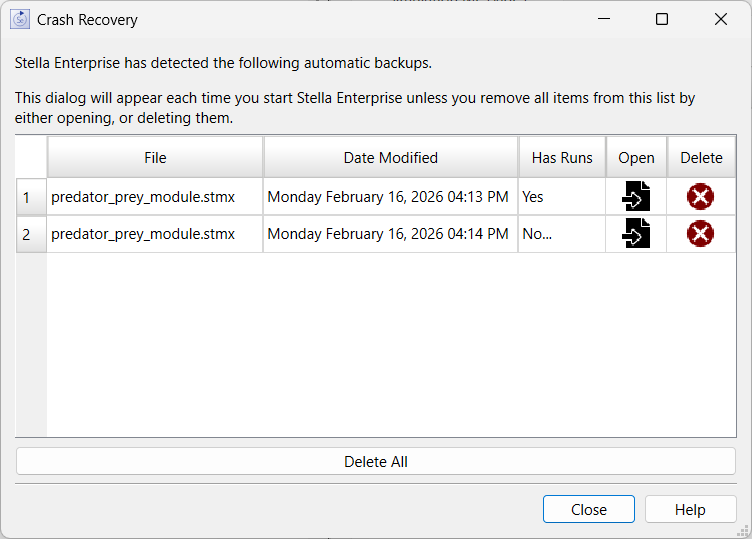
When you open Stella it periodically creates backups of your model as you make changes. If Stella does not close cleanly, these backups will be available the next time you start Stella and may allow you to recover some or all of the work that might otherwise have been lost.
The Crash Recovery Dialog opens automatically when Stella starts, there is no menu item to open it.
This is the name of the model file that has a crash recovery save. It can be an stmx, itmx or stmz file. The content of this is the same as the content that is saved with the File>Save command - except when Has Runs is No.. as discussed below.
This is the date and time at which the crash recovery save was made. There can be multiple files entries for a single model, so the date is useful for determining which is most likely to be useful.
Indicates whether the runs (isdb file) is included with the recovery save. For saves made periodically while working with the software this will be Yes. When the software closes abnormally and the Unexpected Error dialog box is shown and attempt is made to save all open models that does not include any data, or any controlled variable values. The saves are done this way to make it as likely as possible to capture the current state of the diagram, equations, and interface.
A save that does not have runs should be compared to the last saved model using the Model Comparison dialog box to ensure it is as expected.
Will open the recovery file. The model will be marked as requiring a save as, and if you want to save it to the original name you will be asked if you want to overwrite the file. This will also remove the file from the list. If the list is empty after removal the dialog will close.
Will delete the recovery file and remove it from the list. The recovery file will no longer be available. If there are no files left in the list the dialog will close.
Will delete all of the recovery files and close the dialog.
Will close the dialog but leave all the recovery files in place. The next time you start the software the recovery dialog will appear again.
Will open this documentation page.